DMS - Document Management System
Project Overview
- DMS (Document Management System) is a secure, enterprise-grade web application designed to centralize document storage, access management, collaboration, and file retrieval within an organization.
- The system eliminates scattered file storage and manual document handling by providing a structured folder-based environment with advanced permission control, secure sharing, document search, and user management capabilities.
- The application enables organizations to securely store, organize, share, search, and manage business-critical documents while maintaining complete control over user access and permissions.
Problem Statement
- Organizations often face challenges in managing large volumes of documents and files across teams.
- Common challenges include:
- Unorganized document storage
- Difficulty finding specific files quickly
- Lack of access control and security
- Unauthorized document sharing
- No centralized permission management
- Limited collaboration capabilities
- Risk of accidental data loss
- Poor document tracking and audit visibility
- Inefficient file retrieval processes
- These challenges demanded a secure, scalable, and easy-to-use document management solution.
Objectives
- The key objectives of DMS were:
- Centralize document storage
- Secure sensitive business files
- Provide role-based access control
- Simplify document sharing
- Improve file discoverability
- Enable efficient collaboration
- Reduce manual document handling
- Maintain document security and compliance
- Create an intuitive user experience
Core Modules
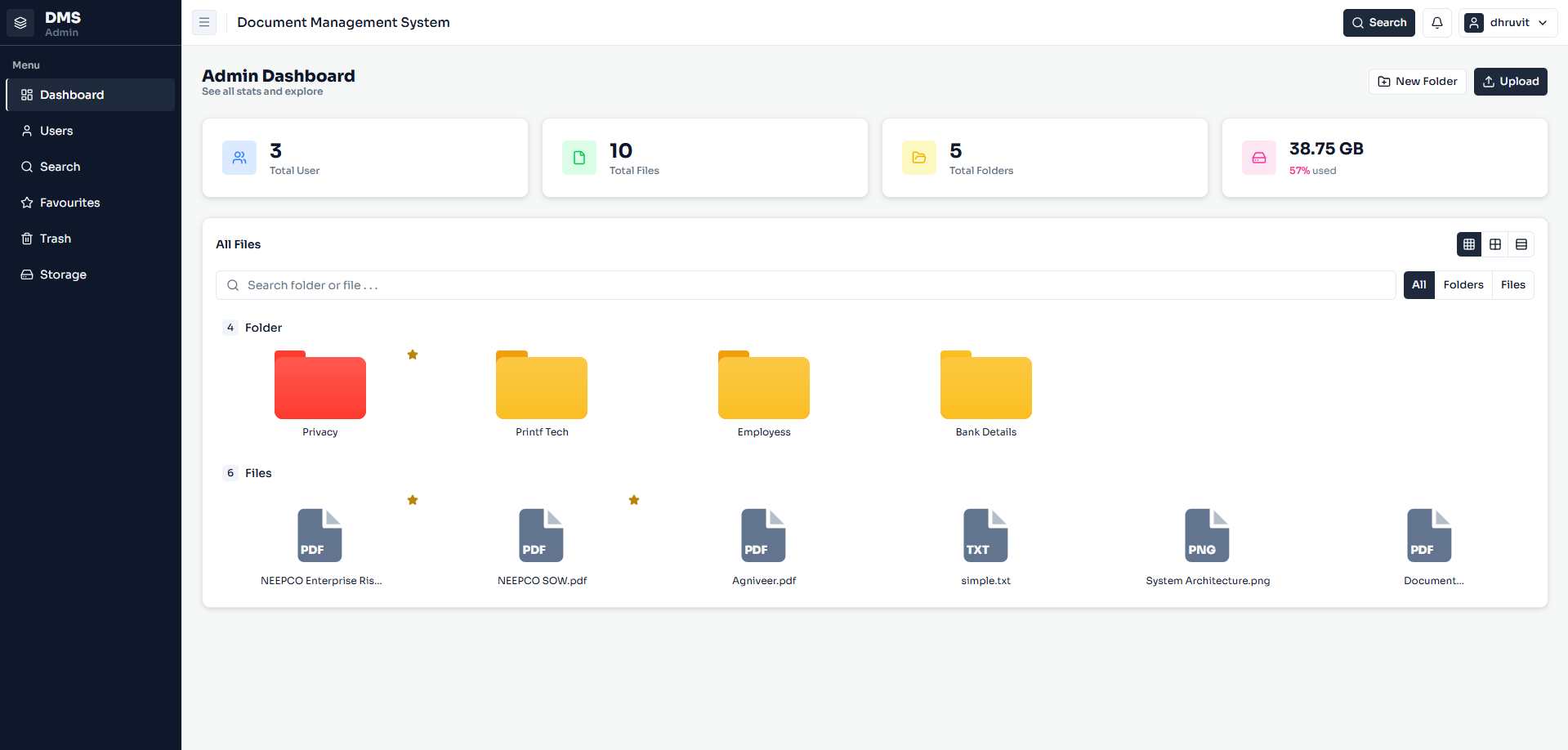
- Dashboard :
- Total users
- Total files
- Total folders
- Storage utilization
- Recent activity overview
- Quick navigation to documents
Folder Management
- Create folders
- Rename folders
- Move folders
- Change folder colors
- Add tags
- Mark folders as favourites
- Manage folder hierarchy
- Organize documents efficiently
File Management
- Users can:
- Upload files
- Preview documents securely
- Download files
- Move files between folders
- Edit file details
- Tag documents
- Organize files systematically
- Supported file types include:
- Images
- Text Documents
- Office Documents
- Other business files
Advanced Sharing & Permission Management
- One of the most powerful features of DMS is its advanced sharing mechanism.
- Users can share folders and files with specific users while defining granular permissions.
- Available permissions include:
- View
- Upload
- Download
- Delete
- Move
- Comment
- The system also supports two permission scopes:
- Folder Only Access
- Users receive access only to the selected folder.
- Entire Folder Access
- Permissions automatically inherit to all files and subfolders within the selected folder structure.
User Management
- Admin Capabilities :
- Create users
- Edit users
- Activate users
- Deactivate users
- Delete users
- Manage user permissions
- Control document access
Smart Search & Document Discovery
- OCR & Text Extraction :
- Keywords
- Sentences
- Phrases
- File names
- Folder names
- Document content
- Search Results :
- Matching documents
- Relevant folders
- Highlighted content matches
- Content-based search accuracy
- Quick document navigation
Favourites Management
- Benefits include:
- Quick access to important documents
- Improved productivity
- Personalized workspace
- Faster navigation
Trash & Recovery System
- Features:
- Deleted items move to Trash
- Files remain available for 30 days
- Restore deleted files and folders
- Permanent deletion after retention period
- Safe document recovery process
Security & Access Control
- Key security features include:
- Role-based access control (RBAC)
- Permission-based document access
- Secure document sharing
- Protected file previews
- Controlled download permissions
- User activity restrictions
- Authentication and authorization controls
- Secure data storage architecture
Technology Stack
- Frontend: React.js + TypeScript
- Backend: ASP.NET Core Web API
- Database: PostgreSQL
- Authentication: JWT-Based Security
- Architecture: Secure Client-Server Architecture
Benefits & Impact
- The DMS platform delivered significant improvements:
- Faster document retrieval
- Improved collaboration
- Enhanced security
- Reduced manual effort
- Better document organization
- Controlled file access
- Improved productivity
- Reduced risk of data loss
- Simplified document sharing
- Enterprise-grade scalability
Conclusion
- The Document Management System (DMS) is a secure, scalable, and user-friendly enterprise solution built to streamline document storage, organization, sharing, and retrieval.
- With advanced permission management, intelligent document search, secure sharing, role-based access control, and centralized file management, the platform enables organizations to manage their documents efficiently while maintaining the highest levels of security and operational control.
- The solution successfully transformed document handling into a structured, searchable, and collaborative digital environment, helping teams work faster, smarter, and more securely.