MCP Servers Explained: How AI Applications Connect With Tools and Business Data
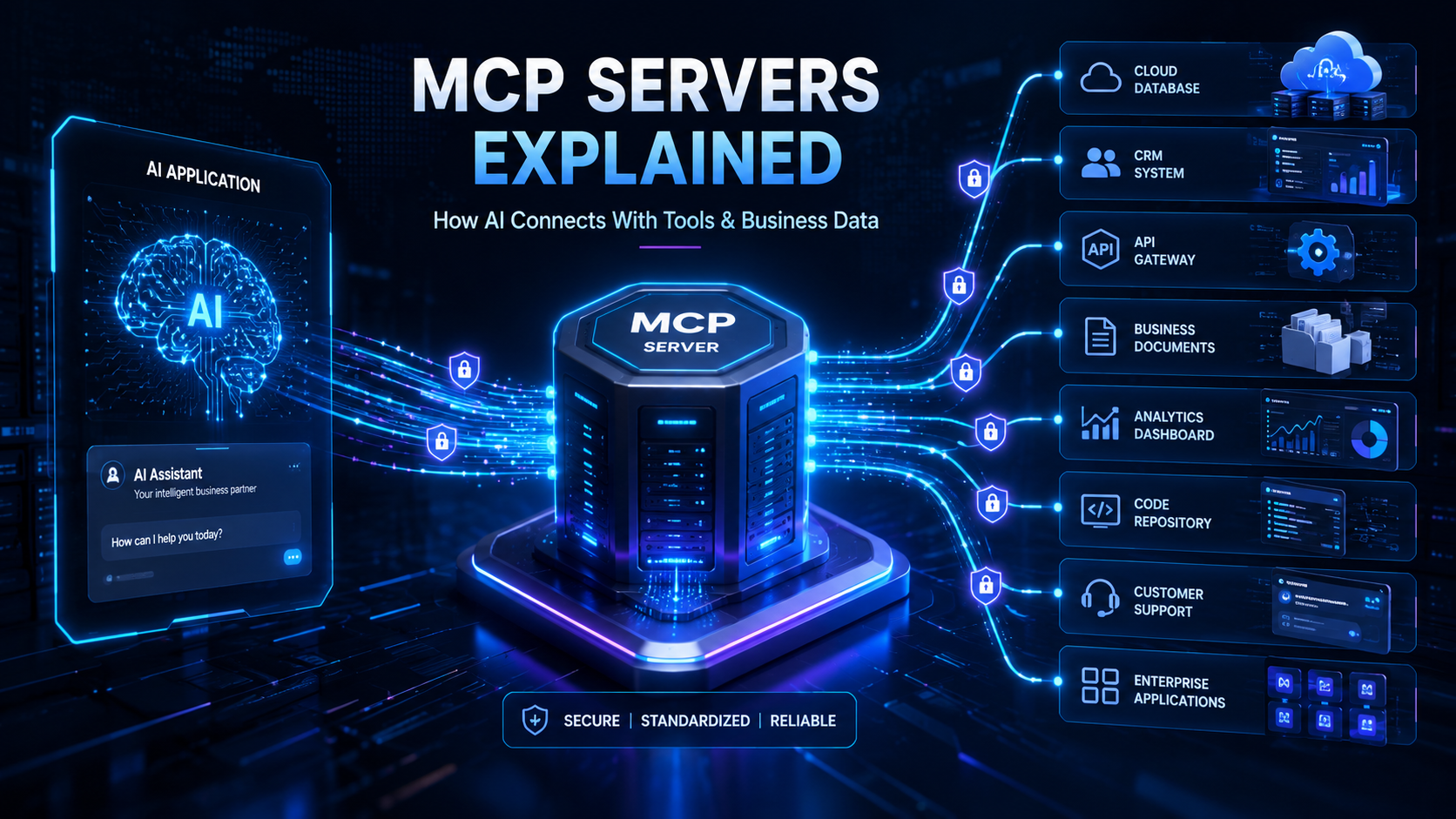
What Is MCP?
MCP stands for Model Context Protocol. It is an open standard designed to help AI applications communicate with external tools and data sources in a consistent way.
A simple way to understand MCP is to think of it as a connection layer between an AI application and other software systems.
For example, an AI model may be good at understanding a question such as:
“Show me the latest sales report and summarize the main changes.”
However, the AI cannot answer correctly unless it has access to the company's sales data. An MCP server can provide a controlled way for the AI application to request that information from the correct business system.
The AI application can then analyze the information and present the result in a simple format.
Why Do AI Applications Need External Connections?
AI models are trained on large amounts of information, but they do not automatically know what is happening inside a specific business.
They may not know the latest order status, current inventory level, customer support history, internal project updates, or private company documents.
Businesses store this information across many different systems, such as customer relationship management software, databases, cloud storage, project management platforms, support systems, and internal applications.
For an AI assistant to become truly useful at work, it needs a secure and controlled way to interact with these systems.
MCP provides a standard approach for creating these connections.
What Is an MCP Server?
An MCP server is a program that makes specific tools, data, or capabilities available to compatible AI applications.
The MCP server sits between the AI application and an external system. It helps the AI understand what information is available and what actions it is allowed to request.
For example, a business may create an MCP server that connects to its customer database. The server could provide capabilities such as searching for a customer, checking account details, viewing order history, or finding unpaid invoices.
The AI application does not need unrestricted access to the entire database. Instead, it can work through the specific capabilities provided by the MCP server.
This approach can make AI integrations easier to organize and control.
How Do MCP Servers Work?
The basic process is easier to understand with a simple example.
Imagine a company has an AI sales assistant. A manager asks:
“Which customers have unpaid invoices this month?”
The AI application first understands the request. It then checks which connected tools are available. If an MCP server provides access to approved billing information, the AI application can request the required data.
The MCP server communicates with the billing system or database and returns the relevant result. The AI application then processes the information and presents it in a clear response.
The overall flow looks like this:
User Request → AI Application → MCP Server → Business System → MCP Server → AI Application → User Response
The AI handles language understanding and reasoning, while the connected business system remains the source of the actual business data.
The Main Parts of MCP
MCP can provide different types of capabilities to AI applications. Three important concepts are tools, resources, and prompts.
Tools
Tools allow an AI application to request an action.
For example, tools could allow the AI to create a support ticket, check an order status, search customer information, schedule an appointment, or generate a report.
A tool is useful when the AI needs to do something rather than simply read information.
Resources
Resources provide access to information that the AI application can use as context.
Examples may include company documents, product information, internal policies, project files, database records, or knowledge base articles.
Resources help AI applications give answers based on relevant business information instead of only general knowledge.
Prompts
Prompts can provide reusable instructions or structured interaction patterns.
For example, a company could define a prompt for creating a weekly project summary or preparing a customer support response. This helps teams create more consistent AI-assisted workflows.
Together, these capabilities make it easier for AI applications to understand what they can access and what they can do.
A Simple Business Example
Consider an online shopping company.
The company uses different systems for customer information, product inventory, payments, shipping, and customer support.
A customer asks the company's AI assistant:
“Where is my order, and why is it delayed?”
Without access to business systems, the AI may only provide a general answer about shipping delays.
With properly configured MCP connections, the AI application could request information from the relevant systems. It may check the order record, review the shipping status, look for delivery updates, and check whether a support ticket already exists.
The AI can then combine the available information and provide a useful answer based on current data.
This is the main value of connecting AI with real business systems.
MCP Servers and APIs
MCP and APIs are related, but they are not the same thing.
An API allows one software application to communicate with another software application. APIs are already widely used for payments, authentication, maps, messaging, cloud services, and many other features.
MCP does not replace APIs.
In many cases, an MCP server uses an existing API behind the scenes. The difference is that MCP provides a common way to expose tools and context to compatible AI applications.
For example, a shipping company may already provide an API for tracking packages. An MCP server could use that API and make the tracking capability available to an AI assistant through an MCP-compatible interface.
The API still performs the original service, while MCP helps the AI application discover and use that capability.
MCP Servers vs Traditional AI Integrations
Before common protocols such as MCP, developers often built separate custom integrations between AI applications and external services.
One integration might connect to a database, another to cloud storage, another to a CRM, and another to a support platform. Each connection could have different code, authentication methods, data formats, and maintenance requirements.
MCP aims to provide a more consistent interaction model for AI applications.
This does not mean that every integration becomes automatic or simple. Developers still need to handle authentication, permissions, security, error handling, and business logic.
However, a standard protocol can reduce some of the repeated integration work and make compatible connections easier to reuse.
How Businesses Can Use MCP Servers
MCP servers can support many practical business applications.
A sales team could use an AI assistant to find customer information, review sales activity, summarize account history, and prepare meeting notes.
A customer support team could use AI to search help documentation, check customer records, review previous conversations, and prepare suggested responses.
A development team could connect AI tools with code repositories, technical documentation, issue tracking systems, and development workflows.
A management team could use an AI assistant to collect information from different approved systems and create summaries for projects, operations, or business performance.
The exact use case depends on the tools and data that the organization chooses to make available.
MCP and AI Agents
AI agents are designed to do more than answer a single question. They may plan steps, use tools, collect information, and complete parts of a workflow.
MCP can be useful for agent-based applications because agents need a clear way to interact with external systems.
For example, imagine an AI agent designed to help manage customer support.
It may receive a customer question, search the company's knowledge base, check account information, review an order, and prepare a response. Depending on the permissions and workflow design, it may also create or update a support ticket.
MCP servers can provide standardized access to the tools needed for these steps.
This is one reason MCP is receiving attention as companies explore more capable AI agents and assistants.
Benefits of Using MCP Servers
One important benefit of MCP is standardization. Developers can work with a common protocol instead of creating a completely different AI integration approach for every system.
Another benefit is reusability. A well-designed MCP server may be used by multiple compatible AI applications.
MCP can also improve separation between the AI application and the underlying business systems. The AI does not need to understand every internal implementation detail. It can work with the tools and resources exposed by the server.
For businesses, this can make AI integration projects easier to organize, expand, and maintain.
Security and Privacy Considerations
Connecting AI applications to business data requires careful security planning.
An MCP server should not give an AI application unlimited access to sensitive systems. Access should follow clear permissions and business rules.
Organizations should consider authentication, authorization, data privacy, logging, monitoring, approval steps, and limits on high-impact actions.
For example, an AI assistant may be allowed to read order information but not cancel an order without user confirmation. Another assistant may be able to search internal documents but only within the files that the current user is allowed to access.
The protocol can support connections, but security still depends on how the complete system is designed and implemented.
Challenges of MCP Adoption
MCP can simplify parts of AI integration, but it does not remove every technical challenge.
Businesses still need to decide which systems should be connected, what information the AI can access, and what actions it can perform.
Developers also need to manage authentication, permissions, API limits, network failures, data quality, and incorrect tool usage.
Another challenge is trust. AI systems can make mistakes or misunderstand requests. For important business actions, human approval may still be necessary.
MCP should be seen as part of a larger AI application architecture rather than a complete solution for every AI integration problem.
The Future of MCP and Connected AI Applications
The role of AI in business software is changing.
The first generation of popular AI applications focused mainly on generating text, answering questions, and summarizing content. The next generation is increasingly focused on connecting AI with real tools, workflows, and business data.
MCP can play an important role in this shift by providing a common way for AI applications to interact with external systems.
In the future, businesses may use AI assistants that can securely search internal knowledge, prepare reports, check project progress, assist customers, analyze operational information, and support everyday workflows.
The success of these systems will depend not only on the intelligence of the AI model but also on the quality, security, and reliability of its connections to real business systems.
Final Thoughts
MCP servers help solve an important problem in modern AI development: connecting intelligent applications with the tools and information they need to be genuinely useful.
The basic idea is simple. The AI model provides language understanding and reasoning. Business systems provide real data and functionality. MCP provides a standard way for compatible applications and systems to connect.
For businesses, MCP creates new opportunities to build AI assistants and agents that work with real company information and support practical workflows.
However, successful implementation requires more than connecting an AI model to a tool. Businesses must carefully design permissions, security controls, data access rules, monitoring, and human approval processes.
As AI applications become more connected and action-oriented, technologies such as MCP may become an important part of modern software development.